

You’ve just finalised some fantastic editorial content and got final sign-offs, it might have even been written by the specialists at Defence Media (you lucky devils), and you’re about to upload it to your website. So how do you ensure that your content is optimised for search engines and it has the best chance of ranking highly on Google? In this blog, we’ve got some top on-page SEO tips for you and a handy downloadable checklist.
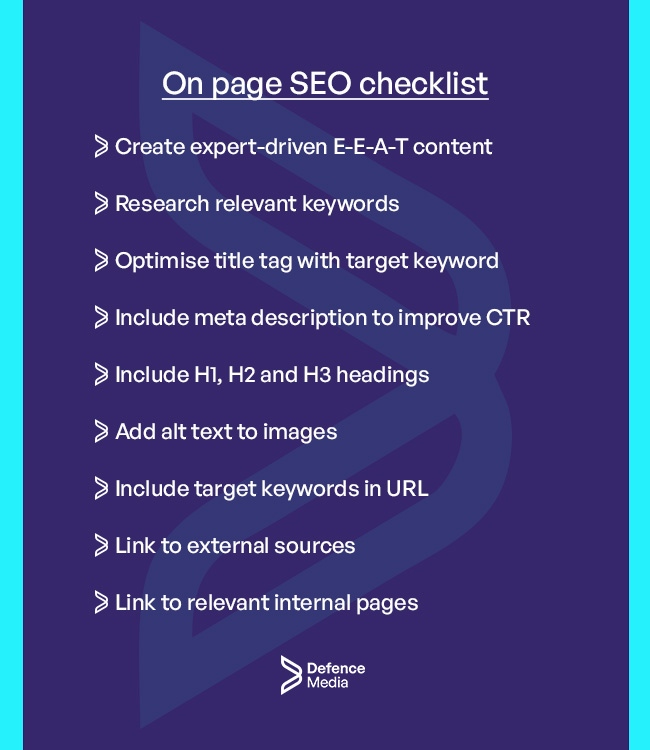
Save time and download our checklist here.
One of the areas where you’ll have most control over search engine optimisation (SEO) is what’s known as “on-page” SEO. As its name suggests, on-page SEO is everything that you can do to optimise the web page itself, including the content as well as other elements such as the page’s HTML.
According to Search Engine Journal, “on-page SEO is an overarching name for the combination of technical and content SEO that revolves around optimising individual pages”.
What are the key areas to consider for on-page SEO excellence?

1. Create amazing, expert-driven content for your audiences
This might sound obvious but it’s one of the fundamentals of on-page SEO and needs to be thought about before you put pen to paper (or fingers on keys).
High-quality content from authoritative and expert sources is what most people will seek out when finding information, especially if they are researching for technical or academic reasons. Even in the age of generative AI, where software can provide bespoke answers to specific questions, there are times when people would prefer to read content from a human that is an expert in the area they are writing about.
Google encapsulates this in the E-E-A-T acronym, which stands for Experience, Expertise, Authoritativeness, and Trust. This is an important consideration for what is known as a Page Quality (PQ) rating, which is what Google uses to evaluate how a webpage achieves its purpose. Trust “is the most important member of the E-E-A-T family”, according to Google, because untrustworthy pages will have low E-E-A-T scores no matter what.
How do you create content that meets the E-E-A-T criteria? Use experts in your organisation to write (or contribute to) articles that cover your specialist area and ensure that you write engaging content that will provide value and insights for your specific audiences. This is especially important for YMYL (Your Money or Your Life) content, which refers to information that pertains to health and wellbeing, or personal money matters.
2. Keyword selection
A key part of optimising your on-page content, it will be important that you leverage keywords and phrases that your audiences use, and the ones that are most achievable in terms of being able to rank highly for them.
If you’re just starting out or your company’s brand equity is still low, then you’ll be looking at a strategy that embraces lower volume, long-tail keywords with “low difficulty” ratings, meaning the chances of you ranking higher are increased. While the traffic you may get from these keywords is lower, it is possible that this will be offset by having an audience that is more engaged and potentially further down the sales funnel.
Another important element of keyword research is ensuring you don’t chase keywords that, while they may have specific meaning to you and your business, do not have any search traffic on Google. Specialist SEO software will give you the search volumes for all types of words and phrases, so it is important that you do the research and understand what people are actually searching for.
Another consideration is to think about semantically similar keywords that will reinforce your page’s content – if we were writing an article on space rockets, then we’d also look at other key phrases as well, such as boosters, engines, and orbital.
3. Optimise HTML elements
This is one of the key areas for on-page SEO but is often overlooked as the focus is placed (quite rightly) on the content itself. HTML (HyperText MarkUp Language) is like the blueprints to a building, providing all the information on the webpage’s structure and layout, which will be essential for the site’s overall appearance and functionality.
HTML elements are used by search engines to understand the contents of websites and specific pages, which then help them sort what is most relevant to a person’s search request.
The most important HTML elements to consider are the following:
- Title tags: This is found in the <title> section of your HTML code, and will be critical as it defines the title of your page and will be used by search engines. It is common practice to include one of your primary keywords.
- Meta descriptions: This provides a summary of your page content and while it is unlikely to have a significant weighting on page ranking, it is important to have a good meta description to improve click-through on SERPs.
- Headings (H1, H2, H3): Headings should be used in your text to give structure and hierarchy. It is important to use a H1 heading (but only once) and ensure you use your main keyword that you want to rank for. H2 and H3 keywords should also incorporate important keywords.
- Alt text in images: Ensure that each image that you use in your blogs or webpages has an ‘alt’ attribute in the <img> tag, which tells Google and other search engines what’s in the image and can have positive results when people are searching for images.
- URL structure: URLs provide a user and search engines an overview of your website’s structure, and a clean, descriptive URL with your chosen keyword can help improve site visibility and overall on-page SEO.
- Linking: Using anchor tags (‘<a>’) for linking helps with so-called ‘link equity’ and helps guide users, as well as search engine bots (the good kind), to other relevant sections of your website. These links can also be to external sources where you’ve sourced your information. While linking may not contribute to overall ranking as it once did, it is still good practice and provides an optimum user experience.
Don’t worry, you do not need to be a coder to make add or change these on your webpage, most web builders these days such as WordPress provide simple-to-use interfaces to change all these parameters without having to edit the actual HTML code.
4. Add images and useful infographics
Another element that can often be overlooked when creating a webpage is additional visual elements. Make sure to add imagery and other non-text content for your webpages, which will break up text and provide an enhanced user experience.
If you deal with data or you feel you can represent your ideas and concepts in a different way, the use of infographics will work really well here, although this will normally require an expert graphic designer. Video is also a fantastic way to add additional content to a webpage or article, so make sure to leverage any content you’ve produced recently or in the past.
Modern web pages can even incorporate 3D models and other elements that require interaction from a user, although these can affect site loading speeds and may actually negatively impact SEO rather than improve it, so use with caution.
Remember that images will have to be optimised to reduce loading times, normally by reducing their size, and also that any imagery used must have alt text (see above) and appropriate copyright permissions, including GDPR waivers signed if employees are included. Video can also impact page loading if it is embedded directly into the page, so consider linking to other hosting sites using their embedding features, which is a very straightforward process.
Conclusion
It’s not enough to simply upload some editorial content to a page and think that will be enough to rank on search engines such as Google. Time must be taken to optimise content itself using high-performing keywords as well as the structural HTML that makes up your webpage. If you can get both right, then you have the recipe for success which will result in valuable traffic to your website for many years to come.